Best Blogger Tips

REMOTELY MONITOR FRIENDS WEBCAM

Are you curious for what your friend or neighbors doing privately?? Be a spy!! Spy on your victim through his webcam, record the scene, then show a compilation of his private doing's.


You can do this through remote-monitoring programs, such as WebCam Monitor on Windows; and even do it through an iPhone using Telekinesis, an iPhone app that allows you to take pictures on a Mac laptop using its built-in iSight camera.


Reminder: Im not responsible if you get caught on action.


By Dude

DISABLE YOUR CD BURNING.


This trick don't allow user to burn CD's 
by disabling the use of the inbuilt CD recording functions of Windows...


So lets try it :
1)Open your registry by opening Start menu-> press Run -> type regedit
2) Find this path:
HKEY_CURRENT_USER>Software>Microsoft>Windows>Current Version>Policies>Explorer 
and create this key: "NoCDBurning" and set its value to 1

Close registry and restart your pc for the changes take effect.. :)


By Dude

CREATE SHUTDOWN/RESTART/LOG-OFF/ SHORTCUTS ON YOU DESKTOP.


On the desktop
->right click> New> shortcut .
....In the location area type


(without quotes) "shutdown -r" to reboot, "shutdown -l" to logout, "shutdown -s" to shutdown.

In the name for the shortcut type in any name you are comfortable with e.g SHUTDOWN or RESTART etc.
Click Finish and voila its done.
Now double-click the icon created to perform the actions

By Dude

CHANGE C:DRIVE ICON..

Some users would have been bored by the boring icons in their My Computer panel which are adjacent to the Hard disk drives (C:,D: or whatever drive letter it is).
Here ill tech you a simple trick by which you will be able to change this standard icon to anything you like,
even your own Picture...


You can put any image in place of one which I have shown,even the picture of your favourite celebrity or your dream whatever it is.


So lets get started:

1)-First, The picture you want to use should have .ico extension(if you already have a pic with .ico extension proceed to step 2).
Most of the pictures we normally use have extensions like .jpg,.bmp,.png..gif etc, 
So you first need to convert them to one with .ico extension. This is simple .Just go here or search the web for alternate site, and put your original image in the 'Source Image 'section,then click on 'Generate Favicon.ico ' button to get your image with .ico extension.

3) - Go to My Computer. Suppose you want to put this icon in place of your original C: image.
4) - Double click and enter C: .Paste your .ico image file in it. Also create a new text file and inside it type the following lines:
                    [autorun]
              ICON=favicon.ico
Remember that 'favicon.ico' in the second line is the name of your image file.
If you have an image file with .ico extension by the name of 'abc.ico',then use that in the second line in place of 'favicon.ico'.

5)-Now rename this text file as ' autorun.inf ' (without the quotes)

Note:How do I rename my text file as autorun.inf ?
Ans: Go to Tools->Folder options.Under the View tab uncheck the 'Hide extensions for known file types'.Press apply.Now rename your text file as 'autorun.inf'.

   Restart your Pc. And voila your done.........

By Dude

COMPUTER ALARM CLOCK.

Are you  too lazy to get up even when the your trusted cellphone dies screeching its lungs out?.

Okay so follow this step:

1) Create a playlist of your favourite songs in Winamp, WMP or any other player. 

2) Export the playlist as a M3U playlist. M3U is generally accepted by almost every player. 

3) Triggering the alarm point to -start> programs >accessories > system tools >scheduled tasks Create a new task and choose program as windows media player or winamp 
(This may work with others too but I haven't tried anything else) Choose "daily", Enter the time and choose "every day" at next screen.

4) It would now ask for password (leave blank in case you don't have one) Right click on the newly created task and check the "run only if logged in" check box. In the properties. Append the path to the playlist you created in the "run" text box. It should now look like
Code:
"D:\windows mediaplayer\wmplayer.exe"K:\Playlists\smoothies.m3u the text inside quotes is my WMP's path. It may vary for you. The text after WMP's path is the one to the playlist.
Click OK and you're done.

By Dude

ANIMATION ON XP.

Did you know you can turn off window animation ("exploding" windows), displayed when you play around with minimizing/maximizing open windows.This makes navigating Windows 95/98/ME/NT4/2000/XP a lot quicker, especially if you don't have a fast video controller, or if you got tired of seeing it all the time (like I did)


To do this,
-Run Regedit (or Regedt32) and go to: HKEY_CURRENT_USER\Control Panel\Desktop\WindowMetrics

-Or if you are the only user of your Windows computer go to: HKEY_USERS .Default Control Panel Desktop\WindowMetrics Right-click on an empty spot in the right hand pane.

-Select New -> String [REG_SZ] Value. Name it MinAnimate. Click OK. Double-click on "MinAnimate" and type 0 to turn OFF window animation or type 1 to turn it ON. Click OK. 
Close the Registry Editor and restart Windows.    Finish

By Dude

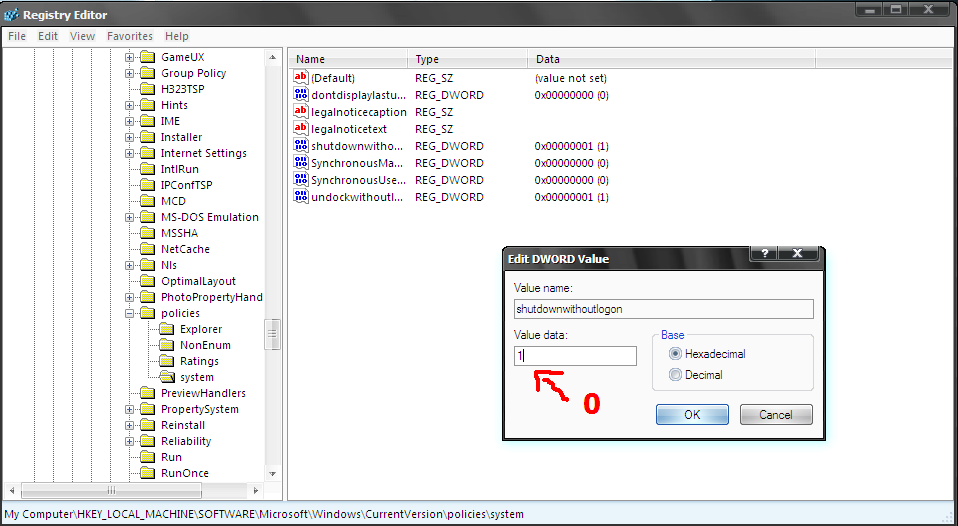
REMOVE YOUR SHUTDOWN BUTTON..

To remove the shutdown button from the logon screen in WinXP and 2000,
1) Just goto->
START-> RUN-> type Regedit

2) Use regedit and navigate to the following key: HKEY_LOCAL_MACHINE\SOFTWARE\Microsoft\Windows\CurrentVersion\policies\system change the value of the dword 'shutdownwithoutlogon' to '0'.


And then exit regedit.

By Dude